
Video analysis in ski training: how it works
A video shows what happens in a run, faster than any explanation at the lift. For analysis to work in everyday training, you need three things: good footage, order in your clips and a quick way to the athlete.
Why video works in youth training
Children and teenagers learn through images. What feels right in a run often looks different on video: hips too far back, the inside arm dropping, shoulders turning too early. When athletes see themselves, they understand the correction and take it into the next run. For coaches, video is also a memory: how did the athlete ski in October, and how in February?
Filming correctly on the hill
- Same spot for all runs. That is the only way to compare runs and athletes. Mark your spot, for example at the third gate from the bottom.
- Film in slow motion. At 120 or 240 frames per second, slow motion plays smoothly and every frame is sharp enough for analysis.
- Landscape and steady. Hold the phone with both hands or use a monopod. Better to stand a bit farther back and zoom in later.
- Show the whole turn. From the gate before to the gate after, so the initiation, steering phase and exit are all in the frame.
- Avoid backlight. Film with the sun behind you, otherwise the skier becomes a silhouette.
Order in your clips: name, discipline, run
After a training day, 80 to 100 clips quickly pile up on your phone. Without a system, nobody can find Lena’s third run anymore. A fixed file name structure has proven its worth:
name_disziplin_lauf_kamera, for example lena_sl_5_u
(The parts stand for name, discipline, run and camera.) Saisonpilot reads the athlete, discipline, run and camera from the file name on upload and assigns the clip to the athlete and the event. You upload the whole day at once and then filter by slalom, run 2 or one athlete. An appended ! or !! marks the clip right away as Coach Feedback.
Analyzing: slow motion, comparison, skeleton
Most insights come from a few tools:
- Frame by frame. The decisive phase of a turn often lasts only tenths of a second. Only single frames show when the edge change really happens.
- Two runs side by side. Two athletes or two runs by the same athlete, aligned to the same start point. You see right away where one goes into the turn earlier.
- Skeleton and joint angles. An AI recognizes body position and draws in shoulder, hip and knee angles. That turns “bend your knees more” into a number you can compare across the season.
- Autozoom. The skier stays centered and the same size in the frame, even when coming from far up the hill. This helps especially on a phone.
- Loop from A to B. Repeat a section in slow motion until the athlete sees it for themselves.
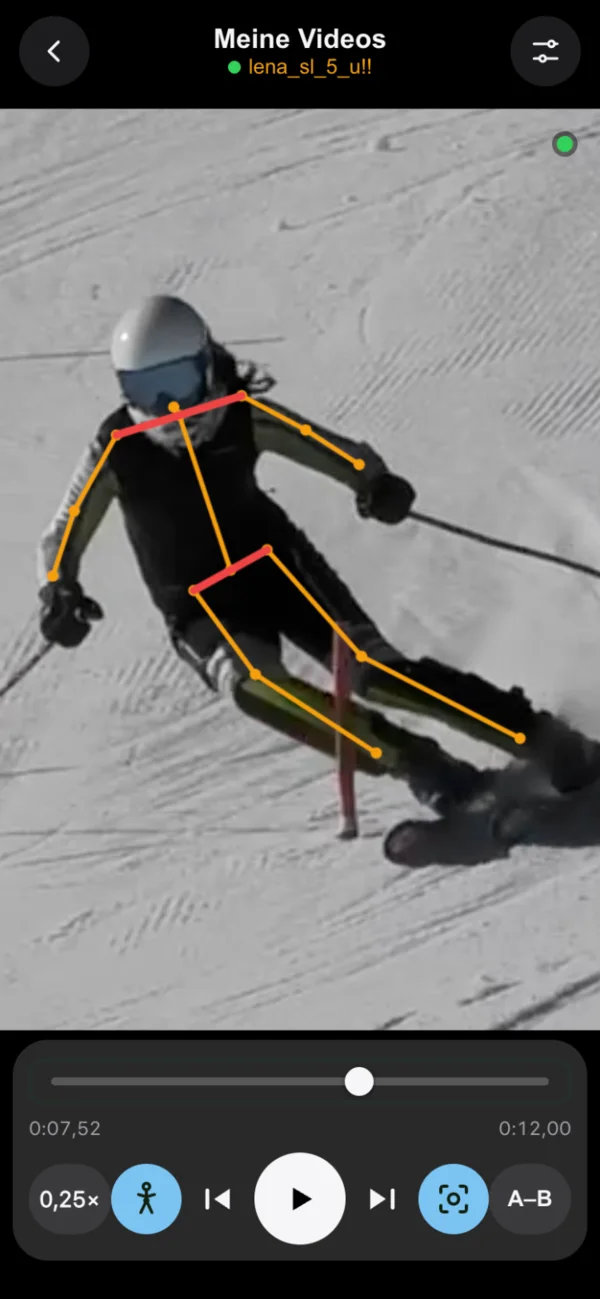
Feedback that lands
The best analysis is useless if it stays in the coach’s folder. One or two points per run are enough. Mark the important clips and send them straight to the athlete’s phone. In Saisonpilot they land in the athlete’s “Coach Feedback” playlist, the athlete gets a notification and ticks the video off as watched. You see who has already watched it. For parents and athletes without the app, the analysis video with skeleton and slow motion can be exported as an MP4.
Privacy for videos of children
Videos of minors are personal data. Before the first recording, the club needs the parents’ consent. Saisonpilot includes the template “Consent to video recording” for this, which parents sign digitally. The videos stay on servers in Germany, and the AI analysis also runs on our own server rather than with a cloud service. Athletes see their own videos, and team videos only with consent.
In short
- Always film from the same spot and in slow motion.
- Name clips using the pattern
name_disziplin_lauf_kamera. - Few points per run, shown with images instead of words.
- Feedback straight to the athlete’s phone, with the parents’ consent.
Try video analysis in Saisonpilot: 30 days free, after that video analysis costs €1.90 per athlete and month.